All posts by jboy1807

Smart Amazon Links for KDP Authors

As a self-published author selling books through Amazon KDP, one of the most frustrating challenges I faced was creating links that would work for readers around the world. If you’re a KDP author, you probably know the problem all too well: Amazon gives you separate links for each country store (amazon.com, amazon.co.uk, amazon.ca, etc.), but there’s no easy way to create a single “smart link” that automatically sends readers to their local Amazon store.

This creates a dilemma: Do you clutter your website with a dozen different links for different countries? Or do you just link to amazon.com and potentially lose international sales when readers are sent to the wrong store and get confused?

Fortunately, I’ve found a simple solution that doesn’t require expensive third-party services or complicated setup. In this post, I’ll show you how to create smart Amazon links that automatically detect your reader’s location and redirect them to the appropriate Amazon store.

See it in action here: https://adventuresofmax.uk/showcase

The Problem with Standard Amazon Links

When you publish a book through KDP, Amazon assigns it a unique identifier called an ASIN (Amazon Standard Identification Number). Your book has the same ASIN across all Amazon stores, but the domain changes depending on the country:

  • US: amazon.com
  • UK: amazon.co.uk
  • Canada: amazon.ca
  • Germany: amazon.de
  • And so on…

Amazon doesn’t provide an official way to create a universal link that works for all countries. Their “OneLink” service is primarily for Amazon Associates (affiliate marketers) and requires setting up Associates accounts in multiple countries.

The Solution: Location-Based Smart Links

My solution uses a bit of JavaScript to:

  1. Detect the reader’s country using a free geolocation API
  2. Redirect them to the appropriate Amazon store for that country
  3. Keep the book’s ASIN in the URL so they land on the correct book page

The best part is that this all happens automatically, with just a single line of HTML for each book!

How It Works

When a reader clicks on your “Buy Now” button:

  1. The script prevents the default link behavior
  2. It calls the ipapi.co API to determine the reader’s country
  3. It maps the country code to the corresponding Amazon domain
  4. It redirects the reader to the correct Amazon store with your book’s ASIN

For example, if a reader in Germany clicks your link, they’ll be taken to amazon.de. If a reader in Australia clicks the same link, they’ll go to amazon.com.au.

How to Implement It on Your WordPress Site

Here’s how I set it up on my WordPress site with Elementor:

Step 1: Create a JavaScript File

First, I created a file called amazon-redirect.js with this code:

javascriptCopydocument.addEventListener('click', function(event) {
  const button = event.target.closest('.amazon-redirect-button');
  
  if (button) {
    event.preventDefault();
    const asin = button.getAttribute('data-asin');
    
    fetch('https://ipapi.co/json/')
      .then(response => response.json())
      .then(data => {
        const countryCode = data.country_code;
        
        const amazonDomains = {
          'US': 'com',
          'GB': 'co.uk',
          'UK': 'co.uk',
          'CA': 'ca',
          'DE': 'de',
          'FR': 'fr',
          'IT': 'it',
          'ES': 'es',
          'JP': 'co.jp',
          'BR': 'com.br',
          'IN': 'in',
          'MX': 'com.mx',
          'AU': 'com.au',
          'NL': 'nl',
          'SG': 'sg',
          'AE': 'ae'
        };
        
        const domain = amazonDomains[countryCode] || 'com';
        window.location.href = `https://www.amazon.${domain}/dp/${asin}`;
      })
      .catch(() => {
        window.location.href = `https://www.amazon.com/dp/${asin}`;
      });
  }
});

Step 2: Register the Script

In my theme’s functions.php file, I added:

phpCopyfunction enqueue_amazon_script() {
  wp_enqueue_script('amazon-redirect', get_template_directory_uri() . '/amazon-redirect.js', array(), '1.0', true);
}
add_action('wp_enqueue_scripts', 'enqueue_amazon_script');

Step 3: Create Smart “Buy Now” Buttons

In Elementor, I added HTML widgets with this code for each book:

htmlCopy<div style="text-align: center;">
  <a href="#" class="amazon-redirect-button elementor-button elementor-size-sm" data-asin="B0DZSPVYFB">
    <span class="elementor-button-content-wrapper">
      <span class="elementor-button-text">Buy Now</span>
    </span>
  </a>
</div>

I simply change the data-asin attribute for each different book.

Step 4: Style the Buttons

I added some CSS to make the buttons match my site’s design:

cssCopy.amazon-redirect-button {
  display: block;
  width: fit-content;
  margin: 0 auto;
  padding: 12px 24px;
  background-color: #61ce70;
  color: white;
  text-decoration: none;
  border-radius: 3px;
  font-family: "Roboto", Sans-serif;
  font-size: 15px;
  font-weight: 500;
  text-transform: none;
  transition: all 0.3s;
}
.amazon-redirect-button:hover {
  background-color: #23a455;
  color: white;
}

Benefits of This Approach

  1. Better user experience: Readers are automatically taken to the Amazon store they can actually buy from.
  2. Higher conversion rates: No more lost sales due to region restrictions.
  3. Cleaner design: No need for multiple links or country flags cluttering your website.
  4. No ongoing costs: This solution is completely free, with no subscription fees.
  5. Full control: You own the code and can modify it as needed.

Technical Notes

  • The geolocation API (ipapi.co) has a free tier that should work fine for most author websites.
  • The script falls back to amazon.com if it can’t detect the reader’s location.
  • This approach doesn’t track affiliate commissions across different countries (for that, you’d need Amazon OneLink or a paid service).

Conclusion

With just a few lines of code, you can create smart Amazon links that provide a seamless experience for your readers around the world. No more frustrating “this title isn’t available in your region” messages, and no more cluttered pages with multiple country-specific links.

Have you tried something similar on your author website? Let me know in the comments if you have any questions or suggestions for improving this approach!
Automation – make.com

Recently, I discovered a fantastic automation tool called “Make,” which offers a 30-day trial with full access to all features. After the trial, you seamlessly transition to the free version, providing ample time to explore and determine if this tool is right for you.

I quickly realized that Make could be invaluable for automating the creation of content across platforms like TikTok, YouTube, Facebook, and X (formerly Twitter).

In this post, I’ll walk you through how I’m using Make to streamline the process of creating video game reviews for my YouTube channel. If you’re interested, you can check out the channel here: PXL Reviews on YouTube.

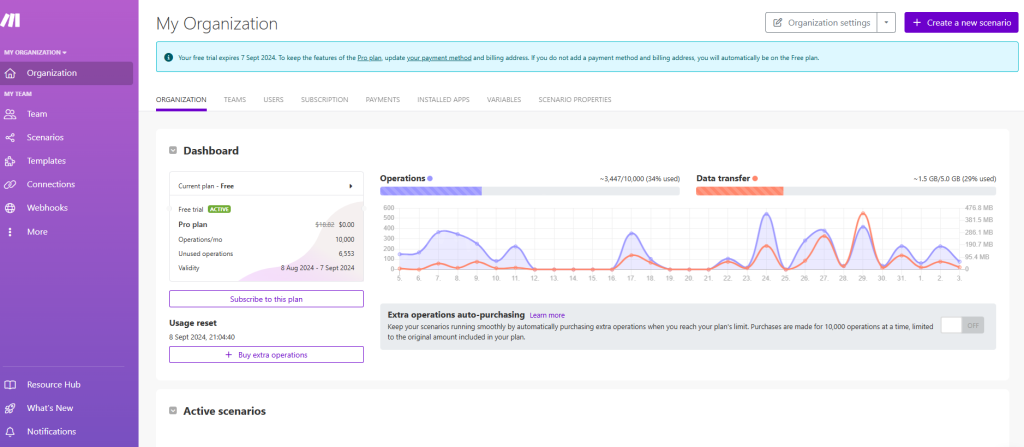
To get started with Make, visit make.com. Once you’ve activated your free trial, you’ll be greeted with a dashboard where you can monitor the performance of your “scenarios.” A scenario in Make is a set of visual instructions that dictate how tasks are automated, with each scenario comprising multiple “modules.” These modules are the actions Make performs, such as connecting to ChatGPT to ask a question or adding a row of data to a Google Sheet.

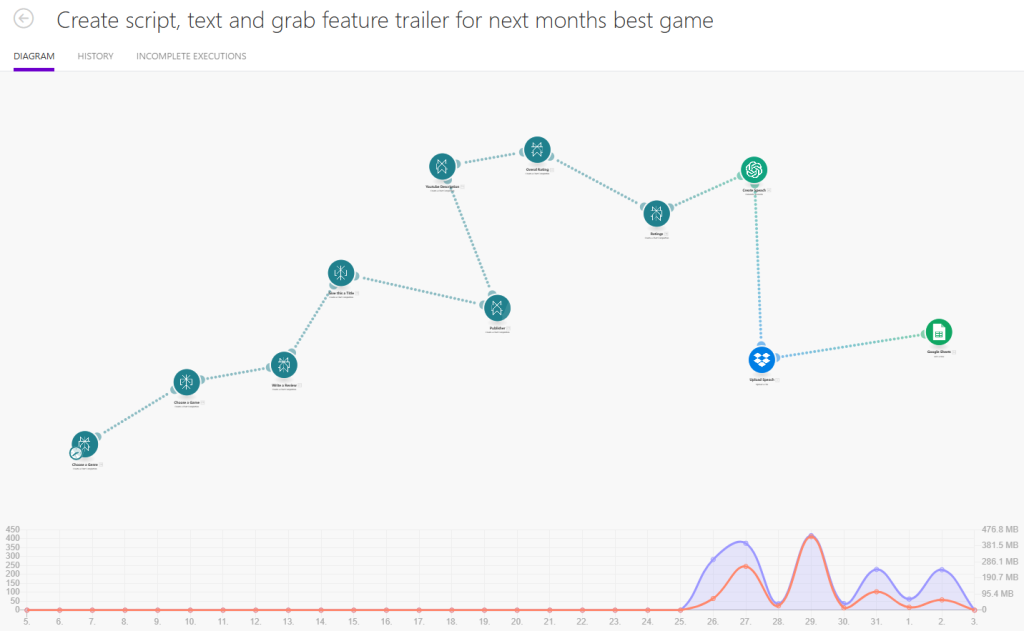
Here’s an example of a scenario I created to automate the production of content for my YouTube channel:

Breakdown

1. Pick a Genre

First, I connect to Perplexity and ask it to randomly select a video game genre. The prompt is simple: “Pick a genre of video game at random and give me the genre as a simple piece of text, with no explanation or other information. Ensure the text does not contain any characters other than letters & numbers.”

The result is then passed to the next module.

2. Choose a Game

Next, I ask Perplexity to provide the title and publisher of an upcoming video game in the selected genre. The prompt is: “Give me the title and publisher of a popular video game coming out soon in the {{28.choices[].message.content}} genre. Provide your answer in the format of the ‘title’ and the ‘publisher’ of the game. Do not provide any other text.”

This module uses the genre provided by the first module to generate the game title and publisher.

3. Write a Review

In this step, Perplexity is asked to write a review for the upcoming game: “You are a video game reviewer. Write a review on this upcoming game for 2025. {{20.choices[].message.content}}. The text must not exceed 4000 characters and must not contain any section headers.”

The review is generated based on the game chosen in the previous module.

4. Give this a Title

In this simple module, perplexity will provide the title of the game.

5. Publisher

Perplexity then returns the publisher of the game. The information from previous modules (title, publisher, genre) can be used later in the scenario for different purposes.

6. Youtube Description

This module generates a description for the YouTube video, encouraging viewers to like and subscribe.

7. Overall Rating

Here, I use Perplexity to provide an overall rating for the game based on the review. The prompt is: “Give me a one-word rating for this game, choose from either ‘bad,’ ‘needs work,’ ‘good,’ ‘average,’ ‘great,’ ‘fantastic,’ ‘outstanding,’ or ‘breathtaking.’ Do not include any other text other than the one-word rating. Here is the game review: {{21.choices[].message.content}}.”

8. Ratings

In this module perplexity provides a breakdown of key elements of the game and provides a score for each. “bsed on the information you have here: {{21.choices[].message.content}} provide numeric ratings from 1 to 5 (1 being bad, 5 outstanding) for each of the following: gameplay, graphics, sound, value. Do not provide any other text, just the area being rated and the numeric rating in the form of a table.”

9. Create Speech

This module calls upon chatgpt to use its text to speech engine tts-1-hd model to convert the review created earlier into a spoken mp3 file.

10. Upload Speech

Here we use dropbox to save the mp3 file created in the previous module.

11. Google Sheets

In this final module we add a row to a google spreadsheet and record the above data.

title, publisher, genre, ratings, overall rating, youtube description, transcript

Once all these modules run, the scenario is complete. At this stage, I prefer to have some human involvement to ensure quality before uploading the content to my YouTube channel. This helps avoid uploading subpar content and risking subscriber loss.

With the data saved to a spreadsheet and the MP3 file ready, I move to the next step. Initially, I used a tool called “Apify” to search YouTube for appropriate game trailers, download them, and upload them to Canva. However, Apify can be costly, and the video quality isn’t always reliable. Instead, I wrote a PowerShell script to search YouTube for relevant videos.

# YouTube Search Scraper Script - John Allison 2024
function Search-YouTube {
    param (
        [string]$query,
        [int]$maxResults = 10
    )
    # Encode the search query for URL
    $encodedQuery = [uri]::EscapeDataString($query)
    $url = "https://www.youtube.com/results?search_query=$encodedQuery"
    try {
        # Send a GET request to the YouTube search page
        $response = Invoke-WebRequest -Uri $url -UseBasicParsing
        # Extract the JSON data containing video information
        $jsonRegex = 'var ytInitialData = ({.*?});'
        $jsonMatch = [regex]::Match($response.Content, $jsonRegex)
        
        if (-not $jsonMatch.Success) {
            Write-Error "Could not find video data in the response."
            return $null
        }
        $jsonContent = $jsonMatch.Groups[1].Value
        $videoData = $jsonContent | ConvertFrom-Json
        $videos = @()
        $videoRenderers = $videoData.contents.twoColumnSearchResultsRenderer.primaryContents.sectionListRenderer.contents[0].itemSectionRenderer.contents | 
            Where-Object { $_.videoRenderer }
        foreach ($renderer in $videoRenderers) {
            if ($videos.Count -ge $maxResults) {
                break
            }
            $videoInfo = $renderer.videoRenderer
            $videos += [PSCustomObject]@{
                Title = $videoInfo.title.runs[0].text
                URL = "https://www.youtube.com/watch?v=$($videoInfo.videoId)"
            }
        }
        return $videos
    }
    catch {
        Write-Error "An error occurred: $_"
        return $null
    }
}
# Example usage
$searchQuery = Read-Host "Enter your YouTube search query"
$searchQuery="official Trailer "+$searchquery
$results = Search-YouTube -query $searchQuery

This script returns 10 potential videos which can be downloaded and used.

Next I have another script which downloads a video from youtube. This script uses an open source tool called yt-dlp. Once you download this tool, place a copy somewhere accessible like c:\windows\system32

# Function to check if yt-dlp is installed
function Check-YtDlp {
    $ytDlp = Get-Command yt-dlp -ErrorAction SilentlyContinue
    if ($null -eq $ytDlp) {
        Write-Host "yt-dlp is not found in PATH. Here are some troubleshooting steps:"
        Write-Host "1. Ensure yt-dlp.exe is downloaded and placed in a known directory."
        Write-Host "2. Add that directory to your system's PATH."
        Write-Host "3. Restart PowerShell and try again."
        Write-Host "Current PATH:"
        $env:Path -split ';' | ForEach-Object { Write-Host $_ }
        exit
    }
    Write-Host "yt-dlp found at: $($ytDlp.Source)"
}
# Function to download YouTube video
function Download-YoutubeVideo {
    param(
        [Parameter(Mandatory=$true)]
        [string]$Url,
        [string]$OutputPath = "c:\users\jwpa\Dropbox\Video Games\%(title)s.%(ext)s"
    )
    try {
        Write-Host "Downloading video from: $Url"
        yt-dlp -f "bestvideo[ext=mp4]+bestaudio[ext=m4a]/best[ext=mp4]/best" -o $OutputPath $Url --write-thumbnail
        Write-Host "Download completed successfully."
    }
    catch {
        Write-Host "An error occurred while downloading the video: $_"
    }
}
# Main script
Check-YtDlp
$videoUrl = Read-Host "Enter the YouTube video URL"
Download-YoutubeVideo -Url $videoUrl

Finally, we have everything we need to create a video review of an upcoming game. To pull this all together I use canva, create a new design set to your chosen medium youtube, tiktok, etc. Upload your mp3 file and your video (be prepared to loop the video a couple of times as they tend to be much shorter than the mp3 file). And VOILA you have the basics done, you should look at opening/closing screens, and maybe add in the ratings to the video.

Conclusion

This example highlights the tremendous potential of Make as a versatile automation tool that can significantly streamline your workflow, especially when integrated with AI tools. By connecting various external resources and applications, Make allows you to automate complex tasks that would otherwise require significant manual effort and time.

In the case of creating video game reviews for a YouTube channel, Make not only simplifies the process but also enhances it by ensuring consistency and accuracy. The ability to automate the selection of a video game genre, the identification of upcoming titles, the generation of reviews, and the compilation of related content demonstrates how Make can be leveraged to produce high-quality content at scale. Each step in the process—from gathering data to generating text, creating audio, and finally uploading content—is seamlessly integrated, reducing the possibility of human error and freeing up valuable time for creative work.

Moreover, Make’s flexibility allows you to customize scenarios to suit your specific needs. Whether you’re managing a YouTube channel, running a social media campaign, or handling any other content-driven task, Make can adapt to your requirements. The inclusion of loops, conditions, and routes within your scenarios adds a layer of sophistication that can handle even the most intricate workflows. This adaptability ensures that the automation you build is not only effective but also scalable as your needs evolve.

The power of Make is further amplified when combined with AI tools like Perplexity and ChatGPT. By harnessing AI, you can automate tasks that require a degree of creativity and critical thinking, such as writing reviews or generating video titles. This integration between Make and AI opens up new possibilities for content creation and management, enabling you to produce content that is both relevant and engaging with minimal manual intervention.

While automation can handle many tasks, it’s important to recognize the value of human oversight. Automated systems are incredibly powerful, but they are not infallible. By reviewing and refining the output before publishing, you can maintain a high standard of quality, ensuring that your content resonates with your audience and retains their trust.

In summary, Make.com is an incredibly powerful tool that, when combined with AI and other automation tools, can revolutionize the way you create and manage content. Whether you’re a content creator, marketer, or business owner, Make offers a user-friendly platform that can help you automate repetitive tasks, enhance productivity, and focus more on the creative aspects of your work. As you continue to explore and refine your use of Make, you’ll likely discover even more ways it can transform your workflow, making it an indispensable part of your toolkit.

BIMI

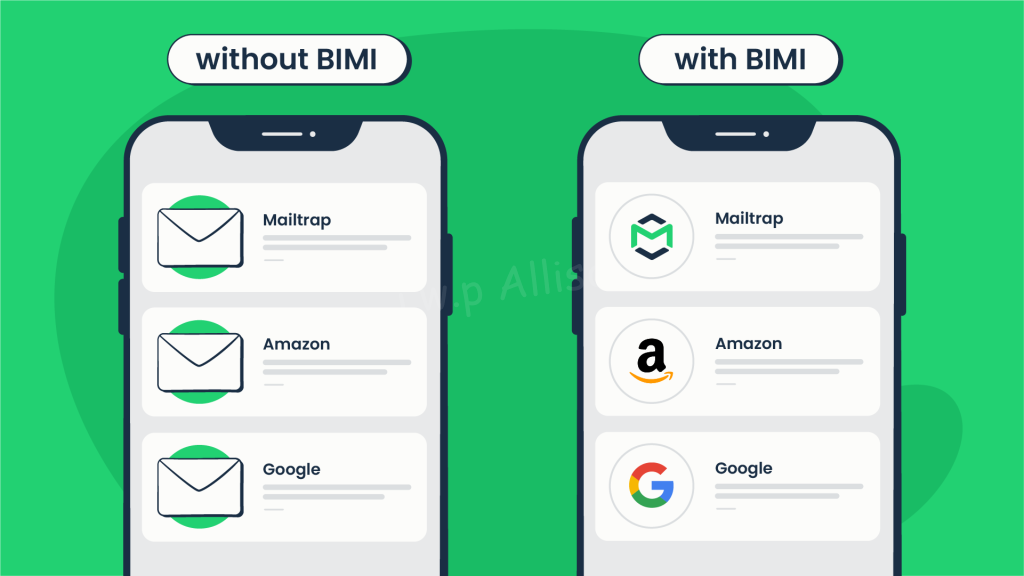
BIMI stands for Brand Indicators for Message Identification. It’s an email specification that allows participating email providers to display a brand’s logo next to their authenticated emails. This helps recipients easily identify legitimate emails from the brand and avoid phishing attempts.

BIMI works in conjunction with three other email authentication methods: SPF, DKIM, and DMARC. These methods work together to ensure that emails are coming from the organization they claim to be from and haven’t been spoofed by phishers. BIMI adds a visual layer of trust to these methods by displaying the brand’s logo.

Benefits of using BIMI:

  • Increased brand recognition: BIMI helps recipients easily identify emails from your brand, which can help to increase brand recognition and trust.
  • Reduced phishing attempts: By making it easier for recipients to identify legitimate emails from your brand, BIMI can help to reduce the risk of phishing attacks.
  • Improved email deliverability: Because BIMI helps to improve trust in your emails, it can also help to improve email deliverability.

BIMI is not simple to implement, but if you value your brand then its more than worth it.

Implementing BIMI involves several key steps:

1. Authentication with SPF, DKIM, and DMARC:

  • This is the foundation of BIMI, ensuring your emails are truly from your organization.
  • You need to implement all three of these authentication protocols and ensure they are aligned (using the same domain).
  • Additionally, your DMARC policy should be set to enforcement (either “p=reject” or “p=quarantine” with “pct=100”). Resources for DMARC setup are available at https://dmarc.org/.

2. Design and Prepare your Logo:

  • Create a high-quality logo that represents your brand in a square aspect ratio.
  • Convert the logo to SVG Tiny PS version 1.2 (Scalable Vector Graphic).
  • If you plan to certify your logo then it must be trademarked – you MUST use the exact trademarked logo in SVG format.
  • Conversion tools can be found here: https://bimigroup.org/svg-conversion-tools-released/

3. Obtain a Verified Mark Certificate (VMC) (Optional):

  • While not mandatory, a VMC from a trusted provider like Entrust or DigiCert can enhance your sender reputation, especially for providers like Gmail and Apple.
  • This requires a trademarked logo beforehand.

4. Publish a BIMI record in your DNS:

OPPO Find N2 Flip

As a self-proclaimed tech enthusiast, I’m always on the lookout for the latest gadgets and devices that make life more fun and efficient. Recently, I decided to take the plunge and upgrade my smartphone from the Samsung Galaxy Flip 3 to the OPPO Find N2 Flip. In this blog post, I’ll share my experience, highlighting the differences between the two devices and the reasons why I chose the Find N2 Flip. So, buckle up and let’s dive into the world of foldable smartphones!

While the Samsung Galaxy Flip 3 served me well for the time I used it, I began to notice a few areas where it fell short of my expectations. Most notably, its battery life was dwindling, and the camera performance, especially in low light conditions, left much to be desired. As someone who loves capturing memories, I knew it was time to explore a new device that could offer me better performance and features.

Enter the OPPO Find N2 Flip

OPPO has been a prominent player in the smartphone market for a while now, and their entry into the foldable segment with the Find N2 Flip caught my attention. After extensive research and reading numerous reviews, I decided to take the leap and purchase the device. Here’s why:

  1. Battery Life

The OPPO Find N2 Flip comes with a 4,300mAh battery, which is a significant improvement over the 3,300mAh battery in the Samsung Galaxy Flip 3. I’ve noticed that I can now go through an entire day of moderate to heavy usage without needing to charge my phone. This has been a game-changer for me, as I no longer have to worry about my phone dying in the middle of the day.

  1. Camera Performance

The Find N2 Flip boasts a 50MP primary lens and an 8MP ultrawide lens. In comparison, the Galaxy Flip 3 has a dual-camera setup with 12MP primary and ultrawide lenses. The difference in camera performance is noticeable, particularly in low-light conditions where the Find N2 Flip excels.

  1. Display and Design

Both devices have foldable displays, the Find N2 Flip features a slightly larger 6.8-inch AMOLED display compared to the Galaxy Flip 3’s 6.7-inch screen. But it’s the external screen where you see the biggest improvement. The Find N2 Flip comes with an impressive (and ever so useful) 3.26-inch screen compared to the Galaxy Z Fips measly 1.1-Inch

The Find N2 Flip’s design also struck a chord with me. The hinge feels sturdy and durable and shows almost no sign of the folding crease, and the overall build quality exudes a premium feel. The device is also slightly wider & thicker than the Galaxy Flip 3, making it more comfortable to hold and carry.

  1. Software and Performance

The Find N2 Flip is powered by a MediaTek Dimensity 9000 Plus, clocking in at 3200 MHz, compared to the Galaxy Flip 3’s Qualcomm Snapdragon 888 chipset. While the Galaxy Flip 3’s Snapdragon 888 was no slouch, I can feel the difference in performance when using demanding apps or playing games.

OPPO’s ColorOS has also won me over with its intuitive and customizable interface, offering a nice balance between Samsung’s One UI and Google’s stock Android experience.

Reasons to consider the Oppo Find N2 Flip

  • Shows 61% longer battery life (32:31 vs 20:09 hours)
  • Comes with 1000 mAh larger battery capacity: 4300 vs 3300 mAh
  • 42% better performance in AnTuTu Benchmark (991K versus 698K)
  • Newer Bluetooth version (v5.3)
  • The phone is 1-year and 5-months newer
  • Delivers 11% higher peak brightness (1049 against 944 nits)
  • Has 2 SIM card slots

Conclusion

The decision to upgrade from the Samsung Galaxy Flip 3 to the OPPO Find N2 Flip was a well-thought-out move, and I couldn’t be happier with the results. The improvements in battery life, camera performance, display, design, and overall performance have made a noticeable difference in my daily smartphone experience. While the Galaxy Flip 3 is still a great device, the Find N2 Flip brings a host of upgrades that cater to my needs and preferences.

Adventures with Bind9

Bind9 offers a wealth of features, most of which you probably won’t need, but over time the complexities of an organization usually mean you’ll need to get to grips with things.

Here I’ll introduce a somewhat complex bind9 configuration, explain the background and provide an overview of how things work.

Organization setup

So your organization has a new office with a printer and a couple of file servers. The office is connected via a branch office VPN connection to two other offices. Most services users need access to are located in one of these remote offices and each office has a DNS server.

Office-AThis is your new office, you need to set up a new DNS server here.
Office-BMost services used by users are found here.
Office-CSometimes users need to access services here.

Office-A Configuration

network: 10.30.0.0/16
DNS IP: 10.30.0.2
How does this configuration work?
   1. clients on the local network can resolve IP addresses from the local internal.office-a.com domain
   2. requests for addresses on the internal.office-b.com domain will be resolved locally using the
        db.internal.office-b.com.zone "slave" file
   3. requests for addresses on the internal.office-c.com domain will be forwarded to the DNS server
        in office-C on 10.60.0.2
named.conf.local
zone "internal.office-a.com" IN {
  type master;
  file "internal.office-a.com.zone";
};
zone "10.30.in-addr.arpa" {
  type master;
  file "db.internal.office-a.com.rev";
};
zone "internal.office-b.com" {
    type slave;
    file "db.internal.office-b.com.zone";
    masters { 10.7.0.2; };
};
zone "internal.office-c.com" {
    type forward;
    forward only;
    forwarders { 10.60.0.2; };
};
named.conf.options
options {
        directory "/var/bind/";
        dnssec-enable yes;
        dnssec-validation yes;
        auth-nxdomain no;    # conform to RFC1035
        listen-on port 53 { localhost; 10.30.0.0/16; 10.7.0.0/16; 10.60.0.0/16; };
        allow-query { localhost; 10.30.0.0/16; 10.7.0.0/16; 10.60.0.0/16; };
        forwarders { 8.8.8.8; };
        recursion yes;
};
internal.office-a.com zone file
$TTL 86400
@ IN SOA internal.office-a.com root.internal.office-a.com (
  2022111801
  3600
  900
  604800
  86400
)
@                       IN NS dns
dns                     IN A 10.30.0.2
printer                 IN A 10.99.99.99

Office-B Configuration

network: 10.7.0.0/16
DNS IP: 10.7.0.2
How does this configuration work?
   1. clients on the local network can resolve IP addresses from the local internal.office-b.com domain
   2. requests for addresses on the internal.office-a.com domain will fail
   3. requests for addresses on the internal.office-c.com domain will be forwarded to the DNS server
        in office-C on 10.60.0.2
named.conf.local
zone "internal.office-b.com" IN {
  type master;
  file "internal.office-b.com.zone";
  allow-transfer { 10.7.0.2; };
  also-notify { 10.7.0.2; };
};
zone "7.10.in-addr.arpa" {
  type master;
  file "db.internal.office-b.rev";
};
zone "internal.office-c.com" {
    type forward;
    forward only;
    forwarders { 10.60.0.2; };
};
named.conf.options
options {
        directory "/var/bind";
        dnssec-enable yes;
        dnssec-validation yes;
        auth-nxdomain no;    # conform to RFC1035
        listen-on port 53 { localhost; 10.30.0.0/16; 10.7.0.0/16; 10.60.0.0/16; };
        allow-query { localhost; 10.30.0.0/16; 10.7.0.0/16; 10.60.0.0/26; };
        forwarders { 8.8.8.8; };
        recursion yes;
};
internal.office-b.com zone file
$TTL 86400
@ IN SOA internal.office-b.com root.internal.office-b.com (
  2022111802
  3600
  900
  604800
  86400
)
@                       IN NS dns
dns                     IN A 10.7.0.2
pc1                     IN A 10.7.0.4
pc2                     IN A 10.7.0.5
pc3                     IN A 10.7.0.6
server100               IN A 10.7.0.217
server101               IN A 10.7.0.218
server102               IN A 10.7.0.219
server103               IN A 10.7.0.220

Office-C Configuration

network: 10.60.0.0/16
DNS IP: 10.60.0.2
How does this configuration work?
   1. clients on the local network can resolve IP addresses from the local internal.office-c.com domain
   2. requests for addresses on the internal.office-a.com domain will be fail
   3. requests for addresses on the internal.office-b.com domain will fail
named.conf.local
include "/etc/bind/named.conf.options";
include "/etc/bind/named.conf.local";
include "/etc/bind/named.conf.default-zones";
zone "internal.office-c.com" IN {
  type master;
  file "internal.office-c.com.zone";
};
zone "60.10.in-addr.arpa" {
  type master;
  file "db.internal.office-c.com.rev";
};
named.conf.options
options {
        directory "/var/bind";
        dnssec-enable yes;
        dnssec-validation yes;
        auth-nxdomain no;    # conform to RFC1035
        listen-on port 53 { localhost; 10.30.0.0/16; 10.7.0.0/16; 10.60.0.0/16; };
        allow-query { localhost; 10.30.0.0/16; 10.7.0.0/16; 10.60.0.0/26; };
        forwarders { 8.8.8.8; };
        recursion yes;
};
internal.office-b.com zone file
$TTL 86400
@ IN SOA internal.office-b.com root.internal.office-b.com (
  2022111605
  3600
  900
  604800
  86400
)
@                       IN NS dns
dns                     IN A 10.60.0.2
active-directoy-pc      IN A 10.60.0.5
centos-server           IN A 10.60.0.217
linux-server            IN A 10.60.0.117
latest_client           IN A 10.60.0.102

FQDNs across multiple DNS zones

As explained earlier the resources most used by the people in Office A are located in Office B, so in order for these people to access these resources they would need to use the FQDN of the resource.

However, if you want to allow the use of a hostname without having to use the complete FQDN then you can make use of multiple DNS search suffixes.

In windows using a static IP you can do this by navigating to the adapter settings, IP4, Advanced, DNS, Append these DNS suffixes (in order), and adding internal.office-a.com and internal.office-b.com. In this example, a user based in Office A would reference printer as either printer or printer.internal.office-a.com, and server100 as either server100 or server100.internal.office-b.com.

Introducing Sharepoint

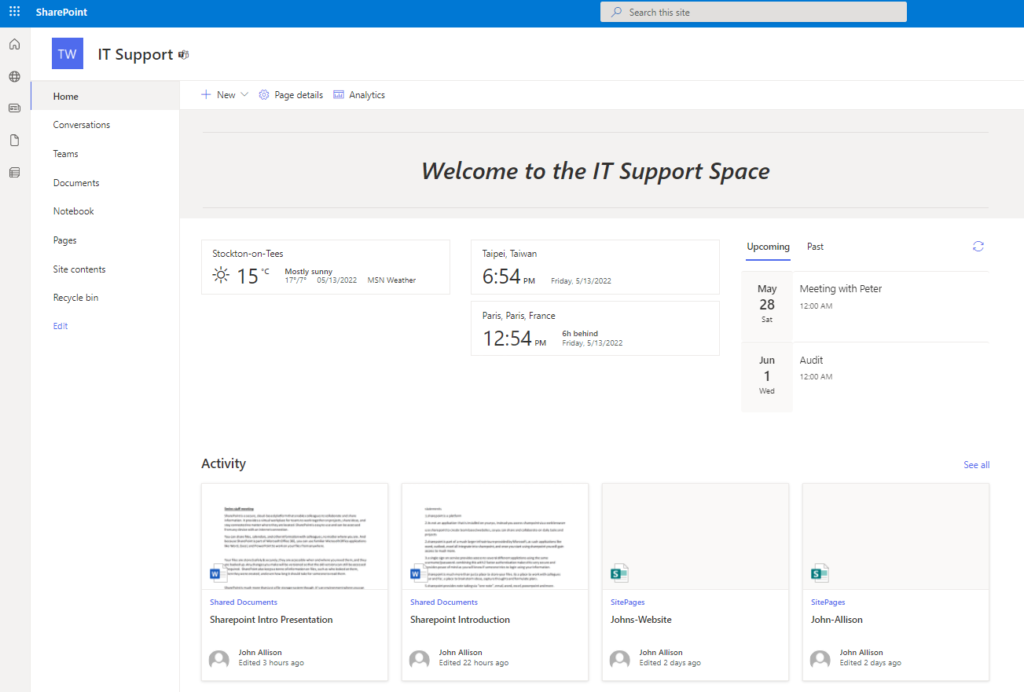
What is SharePoint

SharePoint is a secure, cloud-based platform that enables us to collaborate and share information. It provides a virtual workplace for teams to work together on projects, share ideas, and stay connected no matter where you are. 

You can share files, calendars, and other information with colleagues, you can create lists, automation tasks, document approval processes and more.

SharePoint is part of Microsoft Office 365, so you can use familiar Microsoft Office applications like Word, Excel, and PowerPoint.

Your files are stored safely & securely, they are accessible when and where you need them, and they are backed up. Any changes you make will be versioned so that the old versions can always be accessed if required. 

SharePoint also stores a lot of information on files, such as who looked at them, when they were created, who can access them and what type of access they get, and you can extend this metadata to include more information such as document approval status.

More than file storage

SharePoint is much more than just a file storage system though. It is an environment where you can create & share calendars, to-do lists, task requests, and more. You could think of SharePoint as your virtual office in the cloud. SharePoint can also be used as a communication tool, showcasing information. 

  • File sharing and collaboration
  • Document management
  • Workflows and Alerts
  • Content Publishing
  • Expandable via SharePoint app store

Using SharePoint

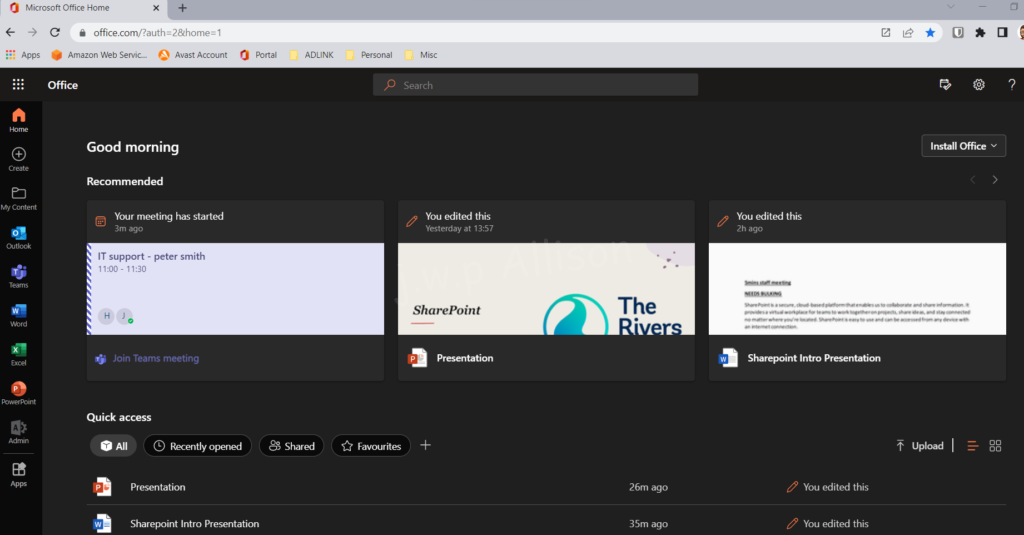
When you access your SharePoint portal, you will see the sites that you have access to – along with files you have recently worked on, files colleagues have shared with you, recent activity, news and more.

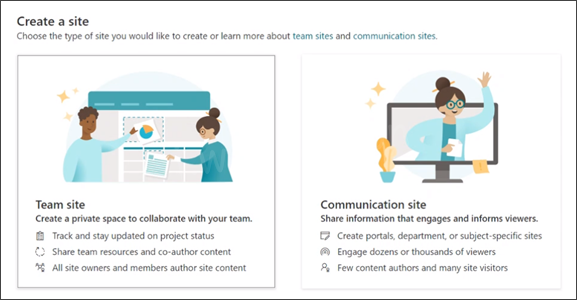
From here you can create a new site, for a new project you will be working on (referred to as a ‘team site’, or a site to show some company information you need to share – this is called a ‘communication site’.

However, usually you will enter an existing site – each site is fully customisable.

Team Site vs Communication Site

SharePoint provides two types of sites, Team sites and Communication sites.

Team Site

Space optimized for a team of people to collaborate on a project or content together. With navigation designed to help you get to and interact with content.

Communication Site

Space designed for  small group of authors to broadcast or publish content. With navigation geared towards browsing information.

Final Thoughts

Before you start using SharePoint it is important to analyse current business processes, file storage arrangements, etc and work on a migration plan.

Although changes can always be made, the more work that is spent planning, the better the implementation will be.

Samsung Galaxy Flip Z

I’ve been a fan of Apple since the iPhone 3G, but have always kept an eye on the growing competition. For me Apple has always been pretty perfect, Android a confusing mess. However I’ve also loved flip phones ever since I laid my hands on the Motorola MPX200, also I guess theirs something of a Star Trek Communicator fetish going on inside my mind.

So along came the Samsung Flip Z and I had to have one. The phone build is good, the camera is ok, battery life is fine, the 2nd screen is useful – it stops you turning on the main screen and acts as a pretty cool 2nd screen when taking photos espeically of others as they can see how they look. The ability to take photos by saying “say cheese” or “smile” is pretty cool, but its the physical attributes that do it for me, pocket size and yet with a full size screen. You really dont notice the fold on the screen, its pretty light and comfortable to hold.

AWS

Amazon Web Services (AWS) is one of the most popular cloud services in the world today. Giving users access to an online data center from which they can run applications.
With services like Google Cloud and Microsoft Azure, there are many cloud services to choose from. However, only a few have managed to establish themselves as the go-to platform for hosting applications.
In fact, in the latest edition of the Gartner report on the cloud services market, AWS was ranked as the third leader in the market.
That’s why it’s not surprising that so many users have turned to AWS for their data center needs.
This article will explain what AWS is and what it can be used for. If you’re ready to get started, keep reading!


What Is Amazon Web Services?

AWS is a suite of cloud infrastructure services that are designed for businesses. These services are offered by Amazon and are designed to make it easy for organizations to start up and run their own hardware-agnostic, cloud-based infrastructures, whether those infrastructures are small or large.

AWS, in other words, is the name of a business ecosystem that’s designed to help businesses host their applications and services.

That may sound like a simple thing to do. However, hosting an application or service on AWS isn’t as simple as relying on a hosting provider that provides shared hosting or dedicated hosting.


AWS Ecosystem

AWS is actually a part of a larger ecosystem. This ecosystem consists of a wide range of services that work together to help businesses manage their AWS infrastructures.

These services include, but are not limited to, AWS management consoles, AWS SDKs, AWS command-line interfaces, and AWS application programming interfaces (APIs).

The ecosystem is designed to help businesses manage their AWS infrastructures, including managing AWS resources, monitoring AWS resources, and automating AWS operations, among many other things.


AWS Benefits

If you’re an IT Manager or Developer, chances are you’ve been in search of a reliable hosting service for quite some time. Maybe you’ve even tried shared hosting and dedicated hosting options, only to be left disappointed because both options were either too expensive or offered subpar performance.

As a result, your search for hosting has been left at an impasse. However, with AWS, you may finally have found the right solution to your hosting woes.

With AWS, you can get reduced TCO, reduced capital expenditures, easier operations, flexible platform, scalability, and increased security.

AWS Drawbacks

While AWS is a great option for hosting your applications and services, it’s not the best option for everyone.

For one thing, the setup process for AWS can be challenging.

Additionally, AWS has its fair share of drawbacks, too. Risk management, system complexity, management complexity, and customization are just a few of these drawbacks. Understanding cost control can be a huge and vitally important challenge, there’s notthing worse than an unexpected bill.

To manage these drawbacks, you may want to work with an AWS expert who can help you understand the pros and cons of the service and ensure you’re using it responsibly.

Conclusion

In conclusion, if you’re a business owner who’s looking to host your applications and services, then AWS is an excellent choice.

With AWS, you can get reduced TCO, reduced capital expenditures, easier operations, flexible platform, scalability, and increased security.

With all of these benefits and drawbacks, it may take you some time to decide which service is right for you.

With all that said, once you make your decision and get started with AWS, don’t be surprised if it becomes your go-to hosting service for years to come.

Free Linux Hypervisor

KVM or Kernel-based Virtual Machine is a free/full virtualistation solution for Linux, it lets you turn Linux into a type 2 hypervisor (some argue its actually type 1, but it really depends on how you configure the server). KVM is not for everyone, and youwill probably be more familiar with VMware, Hyper-V or Proxmox as these all provide better management software.

Simple steps to install a free linux hypervisor

apt update
sudo apt install qemu-kvm libvirt-daemon-system libvirt-clients bridge-utils

thats the easy part, creating a virtual machine is pretty straightforwrd too, but management of multiple machines takes the word stress to a whole new level.

virt-install --name=linuxconfig-vm --vcpus=2 --memory=1024 --cdrom=ubuntu-18.04.6-desktop-amd64.iso --disk size=50 --os-variant=ubuntu1804

How to remotely manage a linux hypervisor

An application called Virt-Manager is pretty useful for managing VM’s both locally and remotely, and can be installed easily enough:

apt update
apt install virt-manager
apt install ssh-askpass-gnome

be aware that virtual machine manager is very buggy, but it makes the creation of virtual machines much simpler and eases the pain of managing a small number of machines.

Fruit Machine

Back in 1989 I spent many hours sitting alone in my bedroom coding away on my beloved Amiga 500. This machine had only 512KB of RAM and was incredibly weak when compared to the power of devices these days.

My hard work was rewarded in January 1990 when a national magazine decided to publish my game on the front cover and distribute it for free across the UK.

Today I might have had the game published on the Apple or Google app stores, and maybe made more than the £150 I received from the magazine.

Unfortuantely this was to mark the end of my dreams of becoming a games designer, the Amiga faded away, technology became more complex and I never managed to get back into it.